Keep the source local.
Open a text-based PDF. Extraction and sensitive-information detection run on your computer using the local Qwen model.
WINDOWS BETA · FREE EARLY ACCESS
Review sensitive information locally before you bring AI into the conversation.
SanitizeGPT finds sensitive details in text-based PDFs, lets you decide what to share, and shows you the sanitized context before optional cloud chat.
No card. Free during beta. Your feedback shapes what comes next.
Client brief Fictional example
Please contact Alex Morgan at alex@example.test about the project timeline.
Outbound preview Sanitized
Please contact [PERSON_1] at [EMAIL_1] about the project timeline.
A MOMENT OF REVIEW. A LOT MORE CONTROL.
Automated detection starts the work. You make the final decision.
Open a text-based PDF. Extraction and sensitive-information detection run on your computer using the local Qwen model.
Redact a detail, allow it, or block the conversation. Consistent placeholders keep repeated entities connected within your chat.
Review the sanitized documents and prompt before sending to your chosen cloud AI. Original values are restored locally in the answer.
TRY A FICTIONAL EXAMPLE
“Please ask Alex Morgan to confirm the timeline.”
OUTBOUND PREVIEW
Please ask [PERSON_1] to confirm the timeline.
Redacted: a placeholder would be sent. This demo sends nothing.A LOCAL APP. A FAMILIAR BROWSER.
The installer starts SanitizeGPT on your computer and opens its interface in your browser. Your local service listens on loopback.
Review documents, manage sensitive details, and inspect what will reach the AI provider in one place.
Read the illustrated installation guide ↗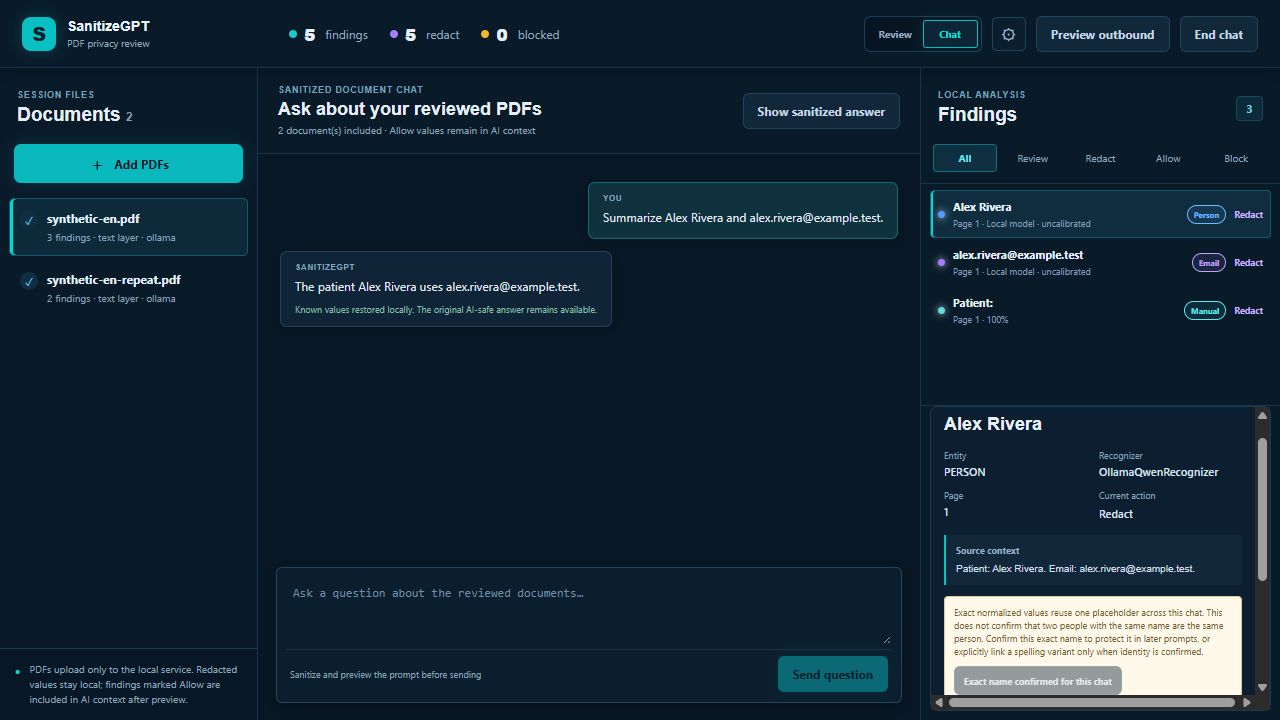
HELP SHAPE THE NEXT VERSION
Try the workflow and tell us where it helps, where it misses, and what gets in your way.
Early beta: unsigned installer. Detection can miss details.
Clean-machine verification is still pending.
YOUR INVITATION TO TRY IT
Verify your email to unlock the installer. No password to remember.
Checking beta availability…
By requesting access, you acknowledge the beta notes and website privacy notice. Updates are optional; you can ask us to delete your account.
BEFORE YOUR FIRST DOCUMENT
Python and Node.js are included or unnecessary. Ollama and model weights are separate from the installer.
Download the Windows installer and follow the illustrated guide. Installation is per user by default.
Install Ollama if needed. SanitizeGPT reuses a compatible local model or asks before downloading the pinned qwen3.5:4b model (about 3.32 GB).
Review every finding and the outbound preview. Scanned PDFs and OCR are outside this beta.
Yes. SanitizeGPT is free during beta, with no announced end date. No payment card or automatic billing. Future pricing will be announced separately.
PDF extraction, Qwen detection, review, and placeholder mappings run locally. Optional cloud chat sends the sanitized context and prompt that you review. Detection can miss information: always inspect the outbound preview.
The Windows beta supports PDFs with an existing text layer. Scanned PDFs and OCR are not supported. Review up to five documents in a chat session.
The installer includes the browser interface, Python processing runtime, and self-contained launcher. You do not need Python or Node.js. Ollama is installed separately; the pinned qwen3.5:4b model is downloaded only with your permission.
After Ollama and the model are ready, local PDF review and detection can work offline. Cloud chat requires internet access and your own supported OpenAI API key. Initial downloads and email verification also require internet access.
This is an early Windows x64 beta. The installer is unsigned, detection needs human review, and clean-machine verification is still pending. Use synthetic or de-identified documents for your first test.
We remember your language choice in a functional cookie for six months.
WEBSITE PRIVACY
We use Supabase Auth to verify your email and store beta registration and download-link requests. Cloudflare hosts this site and private installer storage. Resend delivers verification emails. Zoho Mail processes messages sent to our support address. These providers may process normal request and security logs.
Product updates are optional. No advertising trackers are added by this site. This website does not accept your documents. Please do not email original documents or API keys. To request account deletion or withdraw update permission, email hello@sanitizegpt.com.
BETA NOTES
This early beta is provided as available. Detection is an aid to human review and can miss sensitive information. It is not a compliance guarantee. Start with synthetic or de-identified documents and keep backups.
The Windows installer is unsigned, and clean-machine qualification is pending. There is no automatic billing or announced beta end date. Future availability and pricing will be announced separately.
Release notes ↗